Wednesday, April 2, 2014

Shroud of the Avatar, Richard Garriott's new game!


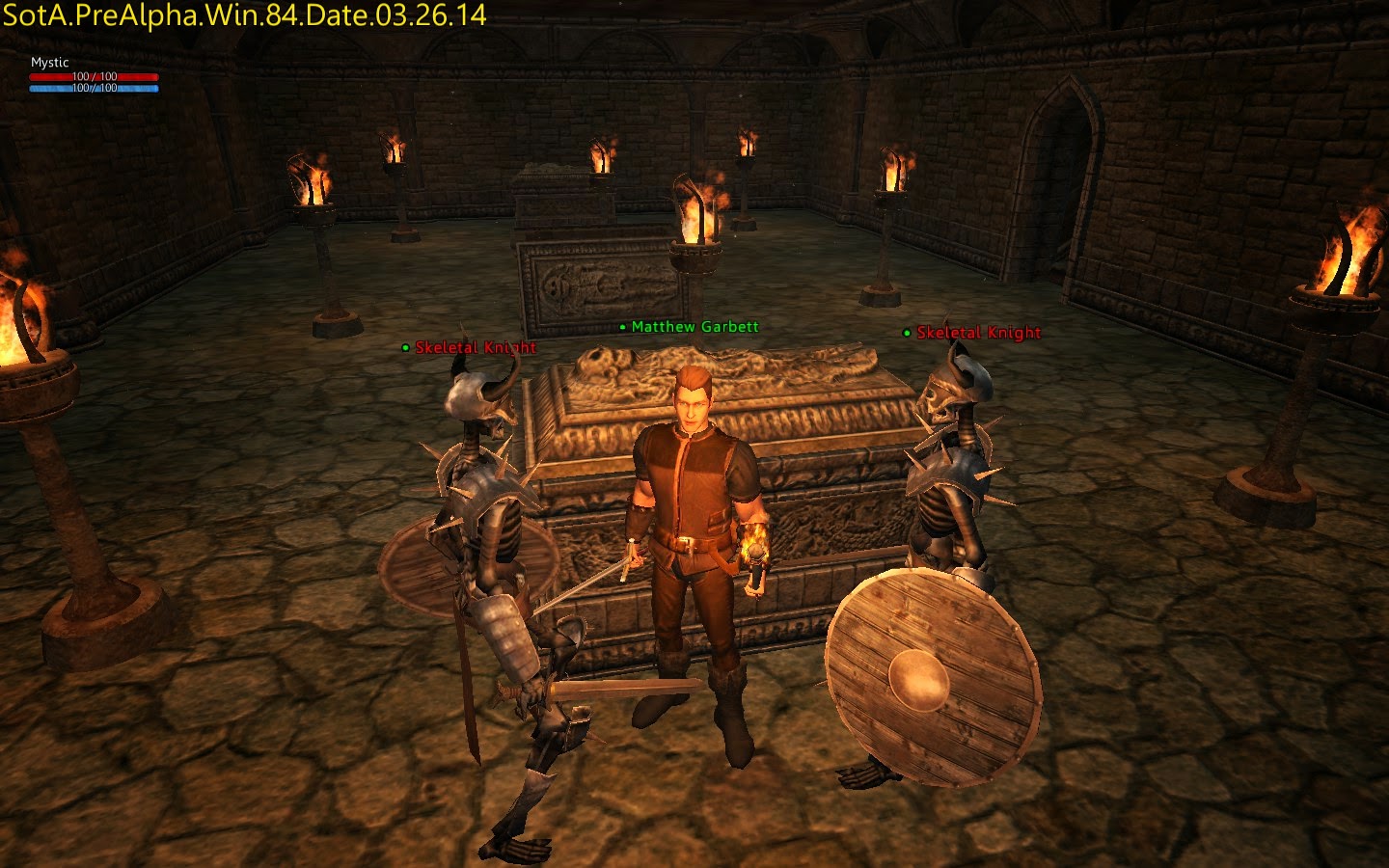
  As of late I've neglected my website and some how still managed to get almost 700 views last month. Some of you may have wonder where I went off to. The simple answer is between life and Shroud of the Avatar I haven't given much time to the site. Now what is Shroud of the Avatar you might ask? Well it's an amazing spiritual successor to Ultima and Ultima Online! The game itself is a new genre that they are calling Selective Multiplayer Online.


  The concept behind this is that you can choose between various modes when you login to the game. Single Player Offline, Single Player Online, Friends Only Online, and Open Player Online (which is closer to an mmo style). The game features a unique overland map filled with hundreds if not thousands of hexes each of which is a large instanced area when you enter it. The game is currently in pre-alpha stages and is scheduled to release later this year around October.
You can buy the game right now by backing it with a pledge. There are several tier levels each with their own set of rewards so the more you pay into and support the game the more rewards you get! By backing the game early you’re able to play in the pre-alpha, alpha, and beta testing of the game. Currently there are monthly pre-alpha play periods at set times the next one being Release 5 which takes place between April 24th to April 27th 2014. Each test period has patches to the game and adds in new features and bug fixes. Although things are still rough around the edges, unpolished, and buggy each and every release has been amazing!
  Shroud of the Avatar will be a game for every time of gamer from crafting, role playing, fighting, and also questing. If you love story Tracy Hickman the author of the Dragonlance series is writing the story in conjunction with Richard Garriott. There is a prequel novel being written with chapters being released every week for those that buy the novel.


  So far my experience of Shroud of the Avatar has been amazing! It brings back memories from my days of playing Ultima Online. It also has an amazing community and developers. If you are a skilled person in art, music, modeling, writing, or possibly programming you can submit things you create to be part of the game and get paid to do so! Not only that but they improve what you submit and give it back to you and you maintain the rights to it and can sell it!


Shroud of the Avatar is looking to be an amazing game so I encourage you all to check it out! I’m the owner of the Shroud of the Avatar Google+ Community so I also encourage you to join us over there and participate in the fun!


Friday, July 19, 2013

Wireless Mobile is the way of the future.

     Technology has been moving at a very fast pace over the past few years. Just a generation ago smartphones and tablets were almost non-existent. Today almost every person has some sort of smart device. A smartphone, tablet, or laptop that they carry with them to work, school, or on trips. Slowly but surely these devices are becoming closer in functionality. It’s harder to distinguish between a smartphone and a tablet and between a tablet and a laptop. A prime example of this is the Asus PadFone. It’s a phone that converts into a tablet with a screen/battery dock and then into a laptop form factor with a laptop dock, all using the phone as the main processing unit. I have a prediction of the future based on many technologies that I have seen released and other technologies that are still being developed. There are two parts of technology, software and hardware, both progressing at fairly fast rates.

Software

     Now let’s look at software for a second, for a very long time people have been using closed source software and their main operating system has been Microsoft Windows and for the most part that’s still true today. However open source Linux based operating systems have been growing at a high rate in the past few years. There are three main Linux based OSes that I have seen being used by consumers those are Android, Chrome OS, and Ubuntu. These three operating systems are very different from each other. Android is made mainly for mobile touchscreen devices such as tablets and smartphones however it has grown beyond that and is on everything from cars to fridges as well as smart TVs. The next Chrome OS is meant to be a cloud based system originally it didn’t even have a desktop interface and was simply Google Chrome with not much else but now with technologies such as Native Client and Packaged Apps it’s growing into a real platform with real programs you can use offline and online. Ubuntu is one of the most well known Linux distributions it’s very versatile for both average consumers as well as developers and high end users until recently however you weren't able to play many games on it but now with the introduction of steam to the platform this is beginning to change. You might be asking yourself why have I brought these Linux operating systems up? Well I think they are the future, even though I myself still use Windows as my primary OS I see myself using Google Chrome and cloud applications for almost everything on my laptop and for anything else on the go it’s Android all the way. There is a main problem with Android and Chrome OS both of them are very user friendly but they are are made for only one form factor. Ubuntu although a very powerful OS still has a lot of problems with being user friendly. Recently Sundar Pichai took over as Senior Vice President for both Android and Google Chrome. Although he has said at this point in time they won’t be merging I would have to say it’s going to happen eventually for multiple reasons. Google Chrome already runs on Android that was the first step but now what if Chrome OS’ desktop environment was merged into android for use on Laptop/Desktop form factors. This would at first have implications on existing Android Apps as well as existing Chrome apps. They would need to be modified to include a desktop UI in addition to the already existing smartphone and tablet UI to enable for smart transitioning between form factors. Basically how it would all work is similar to what we've seen with other products such as the WebTop and Ubuntu + Android. Both of these were awesome products but were ahead of their time and were too proprietary. In the future every phone will have the ability to connect wirelessly to first party and third party external devices and switch to whatever UI that the form factor requires for optimal use.

Hardware

    Now this brings me to the next part of technology which is Hardware. There are several new technologies that will enable us to completely remove the need for any wires and by that I mean no more charge cables, HDMI, USB, or any wires at all. The first technology is called WiGig and it’s a standard that combines Wi-Fi, Wireless Display, Wireless HDMI, Bluetooth, and Wireless USB as well as other technologies. WiGig is suppose to have speeds up to 7 Gbps that’s 7x faster than Google Fiber! WiGig is already in a few devices including a Dell Laptop with a completely wireless docking station. So the next technology is called WiPower which is a wireless charging standard it’s still being developed but it’s already looking very promising in the future we’ll be able to charge our phones and other mobile devices from inside our bags and pockets just by being next to a WiPower hotspot it’ll work similar to a Wi-Fi hotspot except for charging instead of internet. With these two technologies combined you now have a phone that can wirelessly connect to any accessory and wirelessly charge while in a building or a car. Imagine walking into your work office you have a monitor, keyboard, mouse, and printer none of which have any wires your phone uses a combination of sensors to know it’s in the office and automatically connects to them all. You no longer have to worry about forgetting that project at work, home, or on the go. One of the biggest problem with devices lately isn't that they aren't powerful enough but that they don’t do everything and that they don't have long enough battery life. This solution allows you to have a tablet/laptop that is simply a screen and massive battery so they can last you for a lot longer than they would otherwise. Now any place you go you can have everything all in one place with a unified interface without connecting any wires or worrying about your device every dieing! I know it’s going to be a while before this future becomes a reality but we are already well on our way to this future and I can't wait to see what other amazing innovations are coming in the near future.

Sources:
Android - http://en.wikipedia.org/wiki/Android_(operating_system)
Chrome OS - http://en.wikipedia.org/wiki/Chrome_OS
Ubuntu - http://en.wikipedia.org/wiki/Ubuntu_(operating_system)
PadFone - https://www.asus.com/Tablets_Mobile/PadFone_Products/
WiGig - http://en.wikipedia.org/wiki/WiGig
WiPower - http://en.wikipedia.org/wiki/WiPower
Google Fiber - http://www.google.com/fiber
Dell WiGig Laptop - http://goo.gl/FmeSK

Tuesday, April 2, 2013

Shroud of the Avatar the new RPG from Richard Garriot aka Lord British!


So I've talked about Ultima Online in a few of my articles on here. I just wanted to share this great news with you guys that Richard Garriot is making a new game called Shroud of the Avatar that is the spiritual successor of Ultima Online. It is both a single player offline game as well as a full blown online game depending on what settings you choose. It's going to have a lot of things from the Ultima single player games as well as Ultima Online. It's going to be an open sand box type world but also have an amazing story to go along with it! Anyways I'm super excited you can find the game on the website don't forget to back it so you can get in the beta and receive other perks depending on how much you're willing to back! I look forward to seeing you guys in the beta!

https://www.shroudoftheavatar.com/

Thursday, February 28, 2013

6 Reasons why you shouldn't hate the Windows 8.

     A lot of people have told me :"If I get Windows 8 I will most likely disable Metro. I am probably going to hate it." I talked about in my last article, before I started using the final version of Windows 8 Pro, I used to hate metro, it was very unintuitive. The scroll wheel on my mouse didn't move down the menu like I expected it to and I had to hold the bar at the bottom and drag it over, painfully. Now, however, the Start Screen works with the scroll wheel as well as various touchpad gestures on laptops making it much more non-touch friendly. Although I wish I had a touchscreen on my laptop, I'm able to enjoy my Windows 8 experience just fine with a mouse and keyboard. The first thing you’ll notice, that is a little hard to get used to, is the fact that Apps from the Windows Store are full screen as opposed to windowed desktop apps, which are also available in Windows 8 (there are various multitasking features built into Windows 8 to make up for this). Once you learn the simple gestures and shortcuts that have been implemented into the operating system things are easier to manage.

1. Windows Store Apps:

  One of the great new features of Windows 8 is the Windows Store, in which you can find both Windows 8 Apps as well as Desktop style applications. So far desktop application listings simply direct you to the publishers website, Windows 8 Apps however download and automatically update directly from the store. There has always been a need for a one place fits all type store in Windows and now we have it. So far my favorite apps from store are Netflix and pretty much all the games Microsoft has published. Some of the classics have been given a much needed update, including Minesweeper which now includes an "Indiana Jones" type adventure mode.

Example of a Windows 8 App listing

Example of a Desktop App listing 

  There are many misconceptions about the Windows Store. First is that it will be bad for games, because of rating restrictions. This is untrue, games rated M and under are welcome in the store. The only exception is games with an Adult rating can not be in the store. A lot of the games in the Windows Store have heavy Xbox live integration and this is a great feature for multiplayer as well as showing off your scores to other people. Unlike Apple’s App store, open source applications are allowed in the Windows Store which means many free and open programs should be seen in the store. Others fear that Microsoft will limit what applications are in the app store, but this is simply not the case. The certification process is easy and automated, and the Windows App SDK allows you to make sure your app is certifiable. Most applications that exist will need very little changes in order to enter the Windows Store. A while ago I read a great article about someone taking Minecraft and proving how easily it was certified. You can read about that here.

2. Easier Uninstallation of Apps:

  I'm sure that if you're like me and you download various games and programs on your computer you find it annoying when you have to go uninstall them, having to find the uninstaller in the control panel and then click next 15 times and sometimes the installer doesn't even work. Well this problem is completely solved for Windows 8 Apps you right click the live tile and click uninstall and it's gone no clicking next or anything extra. Unfortunately the same process is not as easy for desktop applications if you click uninstall on a desktop app then it will simply open up the program manager in the control panel. I'm hoping in the future that this process will be fixed for desktop applications as well.

3. Multitasking with Windows 8 Apps:
Snapping Apps to left or right of screen.

A great feature in Windows 8 is the ability to snap apps to either side of the screen and use them while in another app or while using your desktop. You can continue to use your programs in the desktop while messaging someone on Facebook or another instant messaging service.

Resizing snapped apps.

    You can also slide the separating border between the apps you have snapped to either side either to take up 2/3rds or all of the screen. If you decide to take up the whole screen the other app or the desktop will hide on what I call the multitask bar until you decide to close it.

Multitask Bar

       The multitask bar appears when you move your mouse from the top left corner down the left side of the screen but, only when you have multiple apps open, for example your desktop and the messaging app. If you right click on any of the apps listed you are given more options but you can also drag and drop the application to snap to either side or drag it all the way down and let go to close it.

Dragging to snap an app to the left of the screen. 


Pulling the app down from the multitask bar and letting go to close it.

Closing a Windows 8 App.

     To close an app simply click and hold on the very top and drag down and let go. If you want to quickly switch between multiple apps just click the very top left corner without having to bring up the multitask bar and it will take you to the next app that's open or your desktop. Unfortunately to scroll through desktop applications you have to use the usual Atl+Tab shortcut. Windows Key + Tab does the same thing with the multitask bar.

4. Easy Searching and Sharing:

 Start Screen with Charm Bar showing.

   One of the key elements in Windows 8 is the Charm Bar this can be accessed at anytime by moving your mouse from the top right corner down the right side of the screen. The Charm Bar contains a Start Button, Search, Share, Devices, and Settings. It changes based on which app you're using at the time. For example on the desktop if you try and share there isn't anything to share from. If you try and share from in Sky Drive or another application with content it will let you share with Facebook via people as well as other apps you may have installed. The Settings and Search also change based on what application you're using.

A basic search from the Start Screen

     Searching for things on Windows 8 is very simple. You can either search through everything or search within the application you're currently running. If you want to search through every thing use the Windows key to get back to the start screen and simply type what you are looking for. You can then filter your search to a specific app or category. You can also search in certain applications in a similar manner like in the Windows Store. In some applications, like Netflix, you must press the search button located on the Charm Bar.

An example search in the Windows Store.

To search for something in the Windows Store, just like on the Start Screen, start typing what you’re looking for and it will automatically begin a search for you.
5. Improved navigation in Windows Explorer.


Basic Windows Explorer window.

   Windows Explorer has been an important part of the Windows Operating System since Windows 95. It's seen many changes, some good and some bad, but I would say that the newest version of Explorer has added some much needed features. The first thing you might notice is the tabbed setup of various available options. These tabs changed based on where you are. My Computer, Music, Pictures, and Documents all have different options that are displayed that help you complete tasks for those different areas of your computer. The options are also collapsible for when you want more space and don't need them. One of the smaller but very useful added features is the up arrow that you can use to navigate between folders.

CMD and PowerShell easily accessible in the file menu.

    For advanced users the added open command prompt and Windows PowerShell options are awesome. I use them on a regular basis. It even lets you open a command prompt directly as an administrator. Another thing that the new Explorer does is display options openly so that casual users will be able to do things they didn't even know there were options for, a lot of which were hidden before such as showing file extensions and hidden files.

6. Faster Boot and more memory for programs.
New and improved Task Manager.

Previous to Windows 8 booting your computer took forever! Every time I boot my computer into Windows 7 I wonder if there is something wrong with it because it takes so long. The boot sequence was completely rewritten to remove parts of it that were no longer needed or that could take place in the background once the computer was in a state where the person could use it. Of course if you are using an SSD booting will be almost instant. However my laptop that only has a regular hard drive boots at least 5 times faster than Windows 7 ever did.

    Windows has never been known for it's CPU and Memory usage. Vista being a prime example, using so much CPU and memory, there was almost nothing left for programs to run. Windows 8 has been optimized to use very little memory and CPU power so that your programs can be free to utilize your computer’s resources to their fullest.

    In conclusion I would just like to say Windows 8 isn't as terrible as people say it is. In the end it's preference of rather you like it or not. However, I hope that I have at least shown you a few good things about it so that you will give it a try and determine first hand if it's for you.

Saturday, October 27, 2012

Windows 8 Release and my experience so far.


     I haven't posted anything for a while I've been pretty busy with school and what not. Now most of you probably know that Windows 8 was officially released on October 26th. I'm a Computer Science major at my college so in August I was able to download and install Windows 8 Pro before the official public release of the operating system. I must say that during the beta of Windows 8 I hated it and didn't like it and I thought "Metro" as it was called was horrible and not optimized for computers with mouse and keyboard. After using it full time I can tell you that I haven't gone back to Windows 7 since. The lack of start button seems odd, at first you find your self looking for it but, after a while the Start Screen seems so fluid and natural. I really like all the Metro apps that I have tried thus far especially the games. Now a lot of it was meant to be more touchscreen friendly but, I have found the final version of Windows 8 works quite well with mouse and keyboard. The key is to get used to it and learn all the different features and shortcuts of the Metro/Desktop hybrid interface that is Windows 8. I would say that overall the operating system is much faster it uses less than half the cpu/ram needed to run Windows 7 so you have more resources to run your many applications. Multi-tasking seems daunting at first but once you realize you can snap metro apps to either side and quickly flip between them it because fairly easy to multitask. I will say there are some aspects of Windows 8 that bother or annoy me and I hope they fix them. First of the fact that desktop applications don't show up as individual programs in the Metro style multitask sidebar while you're in a metro app is slightly bother some. Second it takes a while to find how to shut down and restart your computer it's kind of hidden in the Charm Bar. I easily corrected this by making a shut down shortcut on my Start Screen. Another thing is I really hope that some of the more major programs especially those that are free and open source start to show up in the Windows Store. I really love the Windows Store having one place to get programs for is awesome. I definitely recommend Windows 8 but it does have a bit of a learning curve but once you understand how it all works you won't go back to Windows 7. Anyways hope you enjoyed my little incite on Windows 8 and my experience with using it. I posted a really good article below about misconceptions about Windows 8 I really encourage you to read it if you feel like you have doubts about the os or just want to research a little more.

Tuesday, August 21, 2012

HTC Thunderbolt 4G ICS Sense 3.6 Leak Released!


Going to keep this short and simple there has finally been a leak for the HTC Thunderbolt ICS Sense 3.6 Update you can find it at the link below! Thanks Team Bamf! More to be posted later!!

[ROM][ICS] LEAK for HTC MECHA 7.00.605.2 [4.0.3] 08/21/2012

PAGE DOWN MIRRORS COMING ASAP!

Update:
Mirrors Curtesy of Randy Hoover:
BAMF_MECHA_ICS_08212012.zip
MD5: 68c7c69553c6097ffd5cf36bd016938b
#1 http://tinyw.in/87CV 

Friday, August 17, 2012

Android 4.0 Ice Cream Sandwich with data released for HTC Thunderbolt 4G!


That's right you heard it here first we finally have ICS with working data on the HTC Thunderbolt 4G! Although it's not quite 4G LTE the reported "1x" is getting speeds over 1mb/s which is enough for most casual activities. Most likely 3G is getting reported as 1x based on speed tests by multiple users. While we are waiting on an Official Ice Cream Sandwich update with Sense 3.6 from HTC we have a new build of ICS built from source from the hard working members of the development community Liquid0624 and SP-Jester. It's been a long time to see this released and we all look forward to new bug fixes and feature updates on this rom. The links to the download and forum post are below.

XDA Forum Post and Download

Update: One of the users discovered if you switch it to EvDo only it will display 3G some people are reporting speeds as fast as 2.7mb/s download and over 3.5mb/s upload. We should have 4G LTE very soon with this new break through.

Update 2: It's been pretty well confirmed you can get 4G speeds on this although it will never say 4G or 3G it will always say 1x. It is in the process of getting fix and we should have a new build from source soon.

Wednesday, June 27, 2012

No you haven't been "HACKED!!"


People on Facebook need to do a little reasearch and learn what Hacking, Cracking, and Hijacking is. 99% of the time someone says their Facebook was "Hacked" the term is miss used to mean that someone other then themselves posted a status on their account. The only way this can happen is if you have in one way or another given that person access to your account. In most cases you left your account logged in on a computer where others openly have access to it or you gave someone your password. The last senario is you have a bad password and someone guesses it. I promise you no one that you know has the knowledge or ability to crack Facebook's servers and database to gain access to your account. They could use social engineering to figure out what the password is through you or your friends but they aren't going to brute force or gain access to your account in an actual technical manor. Facebook's security is too good for that. Even if they were able to break in all of the login information is encrypted. Think about this logically no one that is skilled enough to gain access to your account by cracking Facebook and decrypt your login information is going to waste their time to "Hack" into your account and post a couple stupid messages while taking a chance that they by illegally obtaining information would be arrested for that action.

Now what is hacking? and what is Cracking?

"A hacker is a person who is proficient with computers and/or programming to an elite level where they know all the in's and out's of a system. There is NO illegality involved with being a hacker.
cracker is a hacker who uses their proficiency for personal gains outside of the law. EX: stealing data, changing bank accounts, distributing viruses etc.
What the hacker does with their knowledge of systems within the definition of the law is what defines them as a hacker vs a cracker. It's then safe to say that all crackers are hackers, but not all hackers are crackers. This is an important distinction.
The term cracker and hacker are used interchangeably (albeit incorrectly) largely due to the ignorance of the general populace, especially the media."  Source

What is social engineering?

"Social engineering, in the context of security, is understood to mean the art of manipulating people into performing actions or divulging confidential information.[1]While it is similar to a confidence trick or simple fraud, it is typically trickery or deception for the purpose of information gathering, fraud, or computer system access; in most cases the attacker never comes face-to-face with the victims." Source

Now the last thing I will talk about is Account Hijacking. This is when someone or something (in most cases an app you yourself added to your Facebook account) has taken over your account and is posting to your profile and you have no control of it. There is a partial Hijacking where you can login and still have access to your account. There is also a total Hijacking where your password has been changed and you are locked out completely. 

The easiest way to prevent this from happening is to:
A. Don't leave your self logged in on a device others you don't trust have access to.
B. Don't share your passwords with ANYONE. 
C. Make a password over ten characters with Upper Case, Lower Case Alphabetical characters as well as Numbers and special characters if possible.
 D. Don't add ANY Facebook apps to your Profile. Anything that says it can tell you who visited your profile those are a lie and can't access that information because Facebook it's self doesnt store it! These will auto-post on your profile because when you add them YOU GAVE THEM PERMISSION to post things on your profile when ever they want. Many apps will post links that will take your friends to another web page that look exactly like Facebook and ask them to login and STEAL their email and password in order to login in an unauthorized manor!

Now I found a great article about this although I dislike they use the word Hacked in a deragator manor instead of the proper word cracked.


If you would like to know more about this feel free to post a comment. If someone has gained access to your account either a person or an app. Remove all the apps you added and change your password! If you completely loose access to your account contact the Facebook admins.

More information on the subject: 

Monday, March 19, 2012

It's OVER 9000!!


We have finally reached our goal of having over 9,000 views on the site! This is such a great day and we will celebrate it with a video of Dragon Ball Z! Our next goal is 10k! Keep up the good work I will try and post more often and hopefully we will have other writers posting as well!

Google Music

     I've been using Google Music ever since it was released last may. It has completely changed how I obtain and listen to music. I've always been against iTunes and other DRM infested music stores. It was always easier to go buy a CD. Google Music is a DRM free, super easy to use service. You no longer have to worry about syncing your music from your computer using cables. You can either buy music on your computer or Android device in the Google Play Store. It will automatically put the music in cloud storage, download it to your computer, and sync it to your phone.
     I am on an unlimited 4G data plan so except for my one regular playlist I listen to that's set to offline I stream all my music. After I got my new computer all my music remained on my external hard drive and none of it was transferred to my new laptop. I had previously uploaded it all to Google Music. I no longer use Windows Media Player or any other media program on my computer. Any time I want to listen to music I open chrome and click the icon that looks like the picture above and start listening. I save hard drive space, time, and money using Google Music. It's so much easier to just buy a song and have it added to my list right away no more ripping or messing with DRM. I get a DRM free mp3 file that I can use with any device I own and it isn't linked to any one computer or account. If my computer breaks it doesn't matter all my music is safely stored in my cloud storage.
      There are a few disadvantages of Google Music which hopefully will be resolved some day. The first is not every artist or song is on the service. As they continue to make deals to get more music on the store the selection of songs and artists will grow. The other disadvantage is you can only manage your music on the website not on the music program you install on your computer to upload your music. I hope they update the program to better manage your music. It definitely needs a sync music now button instead of having to wait for it to detect changes in your library. The last obvious problem with Google Music is that you can only use it when you have access to the Internet this will never be fixed because it defeats the purpose of the service. I love Google Music and it is clearly a better alternative to iTunes and other music services for many reasons. I encourage you all to give it a try! It's free to sign up and if you already have a Google account you  have access to the service right now. When you sign up for the service you will receive a bunch of free songs as well. Have fun listening to your music!

Source: Google Music

Sunday, March 18, 2012

Pure Ice Cream Goodness.


Android 4.0 Ice Cream Sandwich has been out for a while now. It hasn't really penetrated the market quite yet but devices are continually being updated all the time as well as unofficial ports and AOSP roms for various devices. Mostly everyone seems to love the new Holo theme that is on stock Android unfortunately OEMs still felt the need to skin it. Now the new versions of the various OEM customizations aren't nearly as bad as previous versions. I feel like Google and the various companies that manufacture Android devices can make things easier on them selves and on the consumer if they do a few things. First of all they need to get together and develop a better system for themeing, skinning, and implementing customizations that is open and will allow the consumer to have the kind of interface that they want on their device. With this system when Android is updated to a new version the company should be able to easily load their customizations from the side without having to do a lot of heavy modifications nothing in the Android system should be replaced or changed by the OEM except to add additional hardware functionality. Next OEMs should be required to release the source for hardware specific drivers to allow for open source software development. There is no reason why the source for the hardware drivers shouldn't be released this would let developers experiment and get their own versions of software to work on the hardware easier and faster without having to write custom drivers or hack up a less working setup. This would cause sells of the various hardware to go up and allow Android as a whole to progress further as an open source project! Now with this new system of themeing any one should be able to compile and run Android on any hardware they choose and then in a separate folder load all their customizations from the side not only will there be more ideas implemented from doing this but updates to devices would go much faster and smoother then ever before! This will also allow in-menu options for the users that want to choose between a OEM customized experience or a stock Android experience without any problems at all. I hope in the future that these ideas come true and Android can be a much more open and less fragmented as a system that will be used and loved even more by developers and end users.

Thursday, March 8, 2012

Integration and Consolidation!


           Lately there has been a lot of news about rebranding and consolidation of products on Google. The first move of course was the creation of Google+. So far the goal has been to create a new Google that will merge all the features and services into one product Google+. This has already been taking place over the past few months as all the different pages across Google have been unified in layout and design and integrated into Google+. The next step was "Google Play" which completely rebranded the Android market as well as Google Music, Book, Movies, and other Google Products. Recently Punit Soni a product manager at Google said “By next year, we will not be here talking about Google+ Games, Chrome Web Store games, Games for Native Client and Android games,” he said. “We will be talking about Google games.” This leads me to believe that we will soon see those other services integrated into Google Play. We will then have two major parts of Google the Plus and the Play. The integration and consolidation can get even deeper though. I recently participated in a hangout with Hugo Bara, Director of Product Management at Google. I told him that I really thought that there wasn't a need to have Google+ Messenger, Google Talk, and Google Voice as separate services and that they should be integrated together into one service. His response made me happy. He said they are working on a solution to that problem and that it's something that I would really like. He didn't out right say they were doing what I suggested but to me that meant more then likely we will see a "Chat for Google" all in one smartphone and website app and possible chrome extension or a better solution. I always get excited to see where things are going and I hope eventually I'll be able to be one of the people to move it along.

Source: venturebeat

Monday, March 5, 2012

Mint.com Finances the easy way.


     In a world where spending money is as easy as sliding a card or taping your phone against a scanner it's no wonder people have a hard time keeping track of their finances. I my self struggle with keeping my money in order, not spending too much, and knowing how much money I actually have in my accounts. Mint.com is made by the same people that brought you Turbo Tax, Intuit Inc. It's very easy to setup and use. Once you go to the website and input your login information for each of your different accounts you'll be able to easily manage your finances. It let's you put Credit Cards, Bank accounts, and loans as well as other financial stuff I haven't even tried to figure out yet. Once you have it connected to all your accounts it will import all your purchases and account info. It lists and categorizes every purchase and deposit that you have on your accounts. One of the best features that Mint.com offers is easy budgeting. By default it gives you a basic budget that it allows you to tweak and categorize to fit your needs. It also tells you how much money you can spend  in each of the categories and if you don't have a smartphone you can have it text it to you when you reach the limit on your budget that you have setup. If you have a smartphone then your in luck because the Mint.com app is amazing. I have it on my Android device and I use the widget it comes with to tell me how much cash is in my bank account and how much money I have used on my credit cards. Now keep in mind because Mint.com imports data from outside sources it might not update right away however I find it's usually pretty up to date. This website and app have helped me out a ton and I hope you guys find it useful as well. I posted links below to the website and the smartphone app.

Sunday, March 4, 2012

Miracle Fruit Tablets

    
This is completely unrelated to tech news what so ever, but I thought I would post about it anyways since I had such an amazing experience with these. For my birthday I thought I would try something new and exciting so I ordered these "Miracle Frooties Tablets" which are freeze dried miracle fruit also known as Synsepalum dulcificum. What is Miracle Fruit you ask? Well it's a fruit that causes temporary modification to your taste buds. I like to compare it to when you brush your teeth or eat gum except completely different and amazing. These awesome tablets make foods that are normally sour or not so tasty sweet! While using these I've tried lemons, limes, kiwis, raspberries, and even vinegar! It makes all of these taste so sweet it's well a miracle. Keep in mind though even though they are sweet  they are still acidic I wouldn't recommend eating too many lemons or drinking a lot of vinegar since it'll cause a bad stomach ache. I have tried these with many people since I got them and yes they really do work so give them a try. It's one of the best experiences I've ever had I left a link to buy them below!

Friday, March 2, 2012

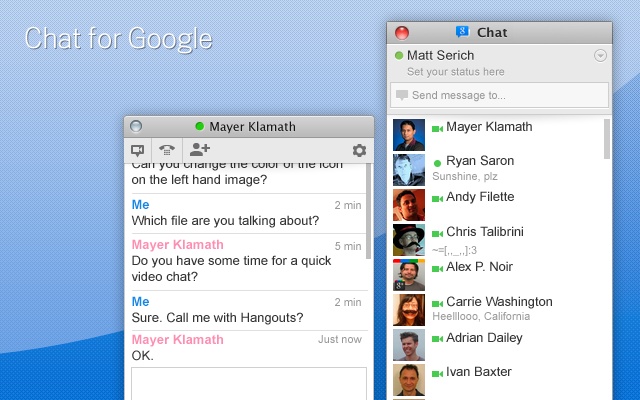
Chat for Google Chrome Extension.

  
 If your like me and you use Google Talk all the time but hate having to go back and forth between G+ and Gmail then this is the extension for you! It lets you have Google Talk right next to your clock open all the time! If you enable background apps it will even run when you close Google Chrome. It's a sleeker interface that's updated on a regular basis and very convenient when your going between web pages or not even using Google Chrome at all. Of course if your busy you can change your status. I encourage people to use this it makes it easier to talk to people when they are on Google Talk all the time. The extension was previously specifically made to work on Chromebooks. It has recently been updated to function correctly on other computer operating system although I've been using it on Windows 7 for the past few months before this update. Using this extension I have been able to make communication with my grandma and other people in a simple mannor they can understand. It even has a button to create a hangout with the people you are talking to. I hope you guys like this extension as much as I do. I posted a link below!


PadFone + Ubuntu?


    Many others have proposed the idea I'm sure, but I thought I would post it once again. This week we just had the Mobile World Congress in Barcelona. Both Asus and Canonical had some pretty awesome announcements at the event. Asus announced their device the PadFone which if you watch the video above is a  Phone that can use a shell and a dock to turn into a Tablet and a Laptop. Canonical announced that they will be implementing their Linux distribution Ubuntu into Android devices. Ubuntu will use the same kernel as Android and run at the same time instead of a dual booting solution. You will be able to access your Android apps and other data inside of Ubuntu as well as running regular Ubuntu applications. Imagine if we combined these two awesome innovations! You no longer need three different devices but a simple all in one device that has both a full computer operating system as well as the Android mobile operating system. This is amazing! Ubuntu also has working virtual machine software which may include the possibility of running other operating systems like Windows and OS X inside of a virtual machine. It has also been demoed that you can run cloud applications running on other types of servers. I hope that both companies see these possibilities and make this all in one device a reality!

The Future of Hangouts.

    
The Google+ Hangout keeps getting updated. There are so many more things that we can do to revolutionize the way we interact with people online. The basic hangout has already allowed us to communicate with people, businesses, and organizations better and more efficiently then ever before. For the first time developers of products have gotten feedback from consumers in a face to face manner over the Internet. In the future, customer service from distant companies and organizations can be conveyed in this manner!
      But hangouts aren't just for businesses, but also for family and friends! You can already talk to ten people from across the country and the world. So what can we do to make it even better? Well there are a lot of things. If you've ever used the "hangout with extras" it has document collaboration and named hangouts. These features can be integrated into the regular hangouts as well as other features. For example file and picture sharing, easier sharing of YouTube videos in the chat, and games. People are already developing Hangout Apps but the few that exist aren't widely known about or used (yet?). Wouldn't you love to see more of these Hangout Apps! 
So what about Official Google+ Hangout Games? Just imagine getting on a Hangout and playing Uno, Monopoly, or even the Game of Life! There are so many board games and card games that can be made into hangout games. Imagine Netflix with family members that have a subscription and have the service connected to their Google Account. There are many other ideas that can be implemented into the hangouts. Below are some links to help you make your own Hangout Apps as well as a couple Apps that are being worked one!

Saturday, February 4, 2012

The Indie Gala!

Just thought I would share another bundle with you guys I just got 11 games and 7 music albums for only $7! This is my first time on this I think the Humble Bundle is a bit better with drm free and cross platform but the games in this are on steam and they look awesome!

Tuesday, January 31, 2012

Humble Bundle now for Android!


I was introduced to Humble Bundle the end of last year by my friend. I've loved it ever since. What is Humble Bundle you ask? Well it's a pay what you want game pack that is put together every so often. Part of the proceeds go to one of many charities. For everything you get in the pack if you bought it separate it would be significantly more. The games are cross-platform Android, Windows, Mac, and Linux. They are DRM free and you also receive steam codes for the Windows and Mac versions of the games as well. You also receive the sound tracks for each of the games. So basically you get super cheap games and you get to give to charity what more could you ask for in life! Humble Bundle is probably one of the best values you can ever get so go pick yourself up a copy right now and get your friend a copy too!

Friday, January 27, 2012

Google+ the Public Social Network.


I just read this case study by this guy Tim Moore about Facebook and Google+. I thought to myself how I use Facebook verses how I use Google+. My conclusion was Google+ is a Public Social Network and Facebook is a Private Social Network. Now what I mean by that is the majority of the things I share with people on Facebook I share with only my friends and not publicly. Now my question is what is the point of even posting things publicly on Facebook I don't really see a way for people to find public posts. I mean yeah you can probably use the search to be honest I've never really tried it before.

 On Google+ almost all of my posts are public and you can find them in multiple ways. If you follow me you can find them, if my post makes it to What's Hot you can find it, if it's reshared, or if you're searching for a certain topic you can find my posts. On Facebook I get very little replies to things I post. On Google+ I have complete strangers that comment, plus one, or reshare my posts. So I find I am more actively using Google+ than Facebook and in fact most of the posts I make on Facebook are just posts or other things I found on Google+. I find this a little ridiculous that most my posts come from Google+. Lately I've been trying to get my friends to try out and use Google+ I prefer it over Facebook and in my opinion I think it's an overall better service if you understand it and know how to use it. I thought I would share this with you guys anyways have fun using Google+!